By default the Firefox web browser saves downloaded files to the desktop. I personally prefer to have my web browsers prompt me where to save a file each time I download something rather than automatically saving it to the desktop etc so this post looks at how to change this default behaviour in Firefox.
The browser version used in this post was Firefox 2 on Windows Vista. The screenshots below should be pretty much the same across different operating systems. I haven’t yet used Firefox 3 yet, which is still in beta, and may need to revise this post (or write another) to cover any differences in the particular version.
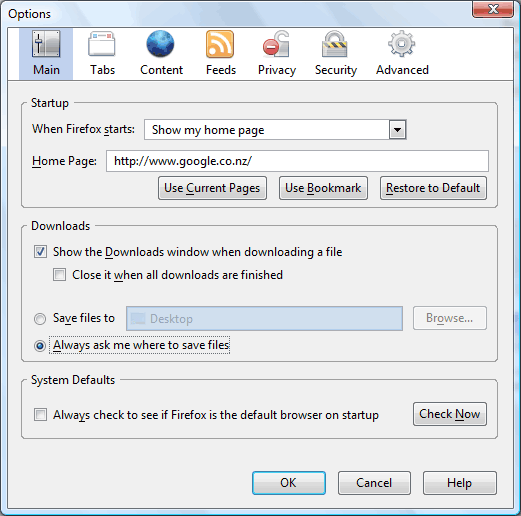
To change where Firefox saves downloaded files by default, or to get it to prompt you where to save them each time, select “Options” from the “Tools” menu. This will open a dialog like the one in the screenshot below. There is a sub section in the main set of options titles “Downloads”. The example below shows the default behaviour with the radio opiton “Save files to” and “Desktop”. You can either click the “Browse” button to change the location files are automatically downloaded to, or change the radio button to “Always ask me where to save files”. Then whenever you go to download a file you will be prompted where to save it.
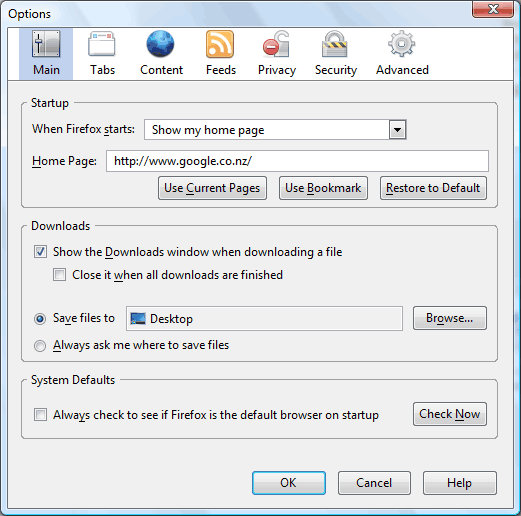
The second screenshot below shows what the settings look like after changing the radio option to “Always ask me where to save files”. After saving the changes by clicking the “OK” button Firefox will now prompt you for a save location each time you download a file.