

It’s possible for a system adminstrator to prevent access to the “Connections” tab in the Internet Options in Internet Explorer (which is also accessible from the Windows Control Panel). It’s trivially easy to restore the tab as shown in this post.
The missing tab
The screenshot below shows the tab that should be there that may have been removed. I’ve highlighted the tab with a red oval:

Restore the tab
Open up the Registry Editor (Start -> Run -> type “regedit” then <enter>) and then navigate your way to:
HKEY_CURRENT_USER
– Software
– Policies
– Microsoft
– Internet Explorer
– Control Panel
Double click the “ConnectionsTab” option and change the “Value Data” value from 1 to 0. The dialog that you do this in is shown in the screenshot below:
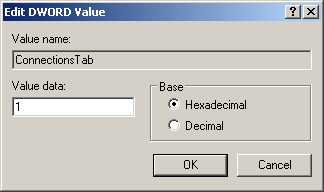
After changing the value to 0, click “OK” and the connections tab will now be available in Internet Explorer’s Internet Options.
