
The pre-CSS way to remove cellpadding and cellspacing from tables was to set the table cellpadding and cellspacing attributes to zero. However it’s a nuisance to have to do this to all tables and it’s easier to do this with CSS. This post looks at how to remove the default padding and spacing from an HTML table with CSS.
Our example table looks like this:
<table>
  <tr>
    <td>Row 1, Column 1</td>
    <td>Row 1, Column 2</td>
  </tr>
  <tr>
    <td>Row 2, Column 1</td>
    <td>Row 2, Column 2</td>
  </tr>
</table>
and with some basic style so we can see the spacing and padding:
table {
    border: 1px solid black;
}
td {
    background-color: #ccc;
}
This results in a table with the default amount of cellpadding and cellspacing as shown in the example screenshot below. The spacing can be seen between the grey background of the cells and the black border.
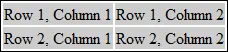
Without any use of CSS to get rid of the cellpadding and spacing you would do this:
<table cellspacing="0" cellpadding="0">
and this would result in the table now looking like this:
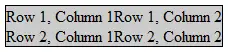
To do this with CSS alone, leave the <table> tag as-is and add the following definitions to the CSS style sheet:
table {
    border-collapse: collapse;
}
th, td {
    padding: 0;
}
The border-collapse table definition gets rid of the spacing and the padding in this instance removes all padding from a cell. Often you will still want padding (our example above makes the data difficult to read with no padding) but this way you can style the default amount of padding yourself separately from the table in the style sheet, and can apply it to either all tables or particular classes or #elements.
