
By default Outlook has a little envelope icon in the system tray; the system tray is where all those little icons are near the clock in the taskbar at the bottom of your screen. You can hide it by right-clicking and selecting the "Hide Envelope" icon but this prevents it showing again when new mail arrives. This post looks at how to re-enable the Outlook envelope icon in the system tray.
The version of Outlook used in this post is Outlook 2007. The instructions may also work in older versions of Outlook (and future versions) but I don’t know for sure. I personally use KMail (a Linux/KDE email app) normally as my main email program and only use Outlook on my laptop to check email when I’m not in my office.
Hiding the envelope icon
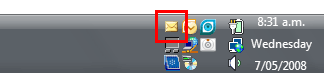
The screenshot below shows the system tray on Windows Vista with, among other icons, the Outlook envelope icon which is highlighted with a red box.
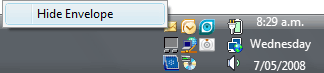
When you click the envelope icon it will show a menu as shown in the screenshot below. If you click the "Hide Envelope" option the envelope icon will disappear and will not show again until you re-enable it using the instructions below.
Re-enabling the envelope icon
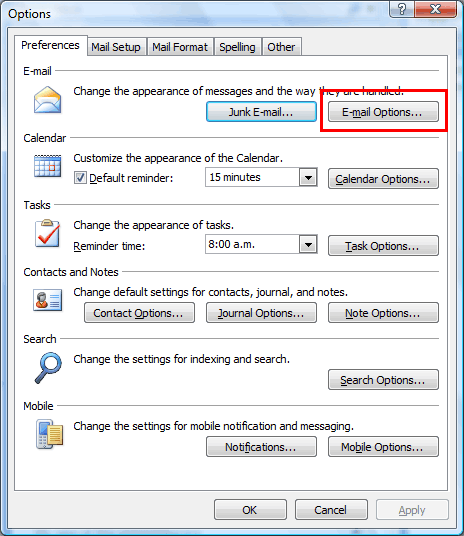
From Outlook, select "Tools" from the main menu and then "Options". You’ll see a window like the one shown in the screenshot below. Click the "E-mail options" button, which is highlighted with a red sqaure in the screenshot below.
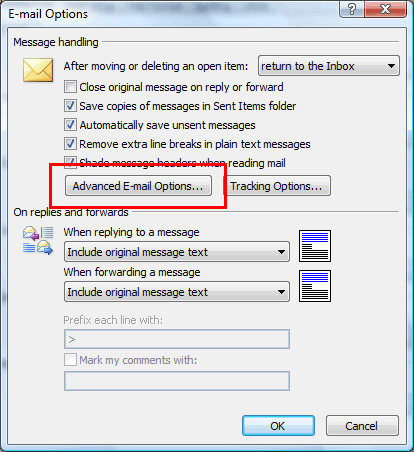
You’ll now see a window like the one below with some email options. You need to click the "Advanced e-mail options" button, which again is highlighted in the screenshot with a red square.
The final screen is show below containing the "advanced" email options. The option to show the envelope icon in the system tray is labelled "show an envelope icon in the notification area" as highlighted by the red box in the screenshot below.
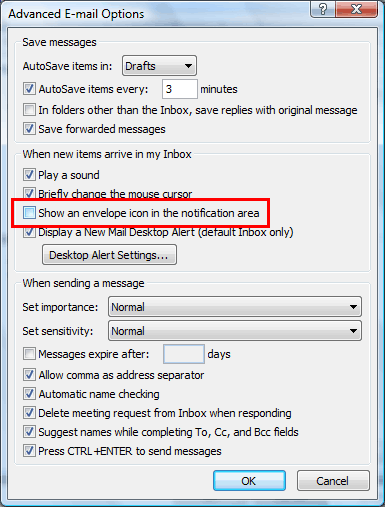
Simply tick the box and keep clicking OK buttons until you get back to Outlook. Now whenever an email arrives Outlook will again show the envelope icon in the system tray.
Update 23 June 2008
Thanks to "EEBizguy" for pointing out that if you are using rules for incoming mail, the envelope icon will not come up regardless of the settings. Only emails that go directly to your Inbox will cause the envelope icon to appear. This is also true if, like me, you are using IMAP and have server sided filtering to automatically filter mail into different IMAP folders; as with the Outlook rules, only mail going directly into the Inbox will cause the envelope icon to appear. Unfortunately there is nothing you can do about this.
