
When looking at emails in several IMAP folders one after the other in Mozilla Thunderbird, I got the following error message and was unable to view that folder and the emails in it.
Unable to connect to your IMAP server. You may have exceeded the maximum number of connections to this server. If so, use the Advanced IMAP Server Settings dialog to reduce the number of cached connections.
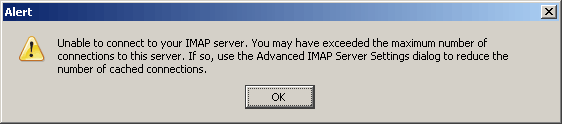
This is normally due to the configuration of the IMAP server (such as Courier-IMAP) which may be configured to only allow a certain number of connections per IP address. Fortunately you can usually solve the issue in Thunderbird by changing the number of cached connections in the advanced settings.
From the menu, select "Tools" and then "Account Settings". This looks similar to the screenshot below:
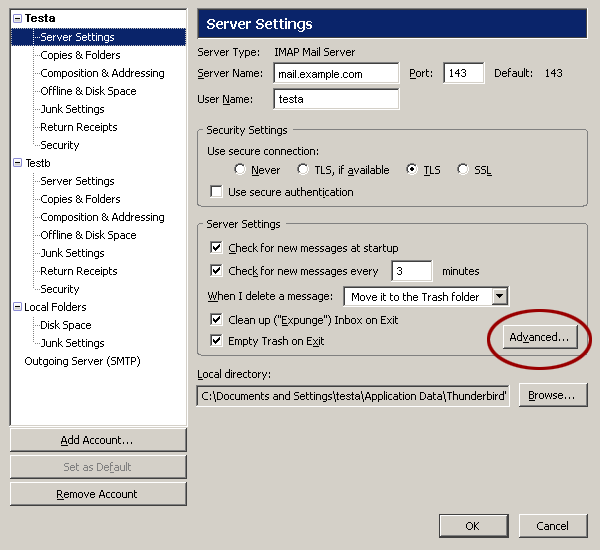
Next, select "Server Settings" under the appropriate account (at the very least you’ll have one account, plus the local folders), and click the "Advanced" button, as shown in the screenshot above. This will show a new configuration dialog like the one show in the screenshot below:
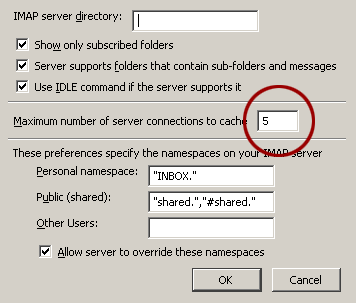
To fix the problem, change the "Maximum number of server connections to cache" value. The default setting is 5. Changing it to 3 or less worked for me, but setting it to 1 should work in all cases and make the error go away.
