
Windows Vista appears to have an annoying bug where sometimes if you insert a DVD-RW with data on it it appears to think it’s a blank disc that needs formatting, and you get the “Prepare this blank disc” message. This post looks at how to solve the problem.
Please see my update at the end of this post as well, as the advice offered here only worked for me personally until the next reboot…
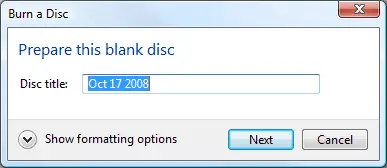
The first screenshot below shows the “prepare this blank disc” dialog. I got this error from DVDs and CDs I’d written from both Windows Vista and Linux. The solution is to uninstall the CD/DVD drive and then scan for hardware changes to reinstall it.
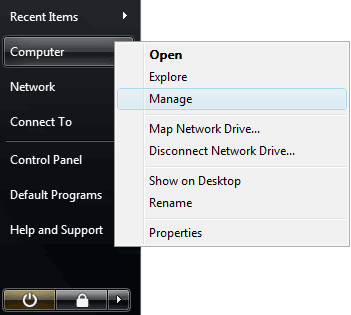
Click the Windows button to bring up the start menu, right click “Computer” and then click the “Manage” option as shown in the screenshot below. The User Account Control will prompt you before you can do anything. Click “Continue”.
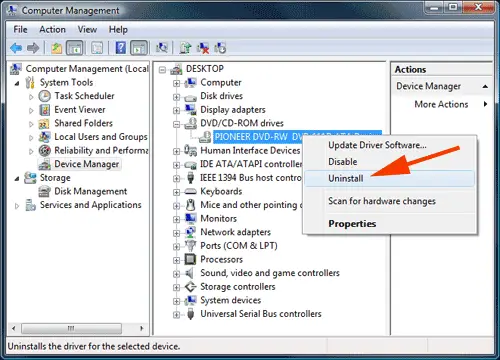
This brings up the Computer Management window. Select Computer Management -> System Tools -> Device Manager in the left navigation as shown in the screenshot below. Then expand the “DVD/CD-ROM drives” option in the middle pane, right-click the device and then select the “Uninstall” option. This is highlighted with a red arrow in the screenshot below.
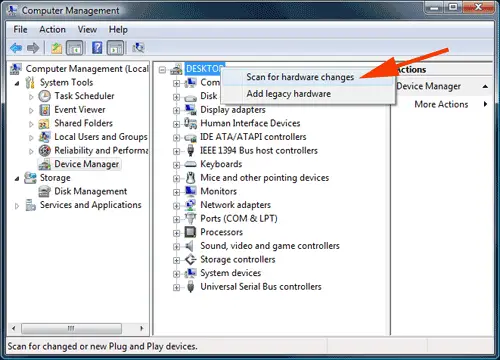
The CD/DVD will then be uninstalled and the list will refresh. Now right click “DESKTOP” and select the “Scan for hardware changes” option. Your CD/DVD will be found and installed.
This solved my issue and I was now able to read the same DVD-RW that Windows Vista had failed to be able to read before. Pretty crazy sort of bug and solution but I’m glad to have it working again.
Update 13 December 2008: While I can use DVDs and CDs with other programs (such as Winamp, InfraExpress and VLC Media Player) with no issue whatsoever, I keep getting this error when using Windows Explorer. Although the fix suggested in this post worked for me, at some point later on it stopped working again in Explorer. I hope you have better luck.
